📘 End-to-End automation testing
✅ Adopted Technological Stack
This technology stack is designed to perform end-to-end (E2E) testing in a reliable and scalable manner. Each component plays a specific role:
- WebdriverIO: A modern test runner that provides APIs for browser interaction through the WebDriver protocol.
- Selenium Standalone-Chrome: A WebDriver server exposing an endpoint to control the Chrome browser in either headless or full mode.
- Node.js: A JavaScript runtime environment responsible for executing tests and managing dependencies.
- Mocha: A BDD/TDD testing framework used to define test structures (describe/it) and assertions.
- Allure Report: An advanced reporting system that generates interactive reports including screenshots, logs, and performance metrics.
- Docker: A containerization platform that isolates the test environment, ensuring consistency across different systems.
- Docker Compose: An orchestration tool used to launch multiple containers (Selenium, Allure, test runner) with a single command.
🔍 Why this architecture?
- Isolation: No dependency on the host system.
- Scalability: Supports parallel execution of multiple test suites.
- Reproducibility: Ensures consistent behavior across local and CI/CD environments.
🏗 System Architecture
+----------------------+           +--------------------------------+
|  Test Runner (WDIO)  |  <-----> |  Selenium Standalone Chrome    |
|  Node.js + Mocha     |           |  WebDriver endpoint :4444      |
+----------------------+           +--------------------------------+
          |
          | genera risultati
          v
+----------------------+
|     Allure Report    | <-- allure-results
|  (Docker Service)    | --> allure-report HTML
+----------------------+
Local with Docker Compose
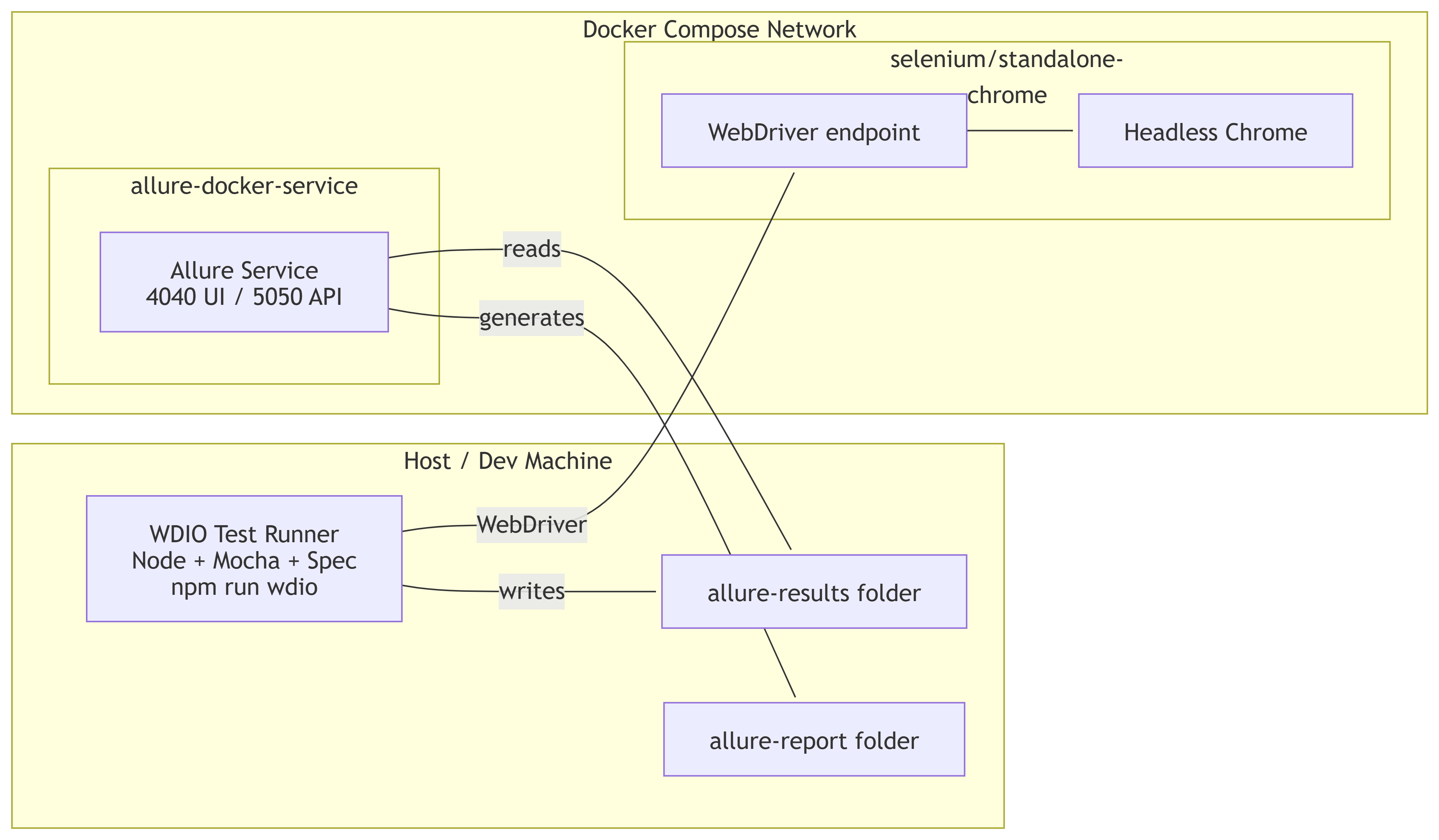
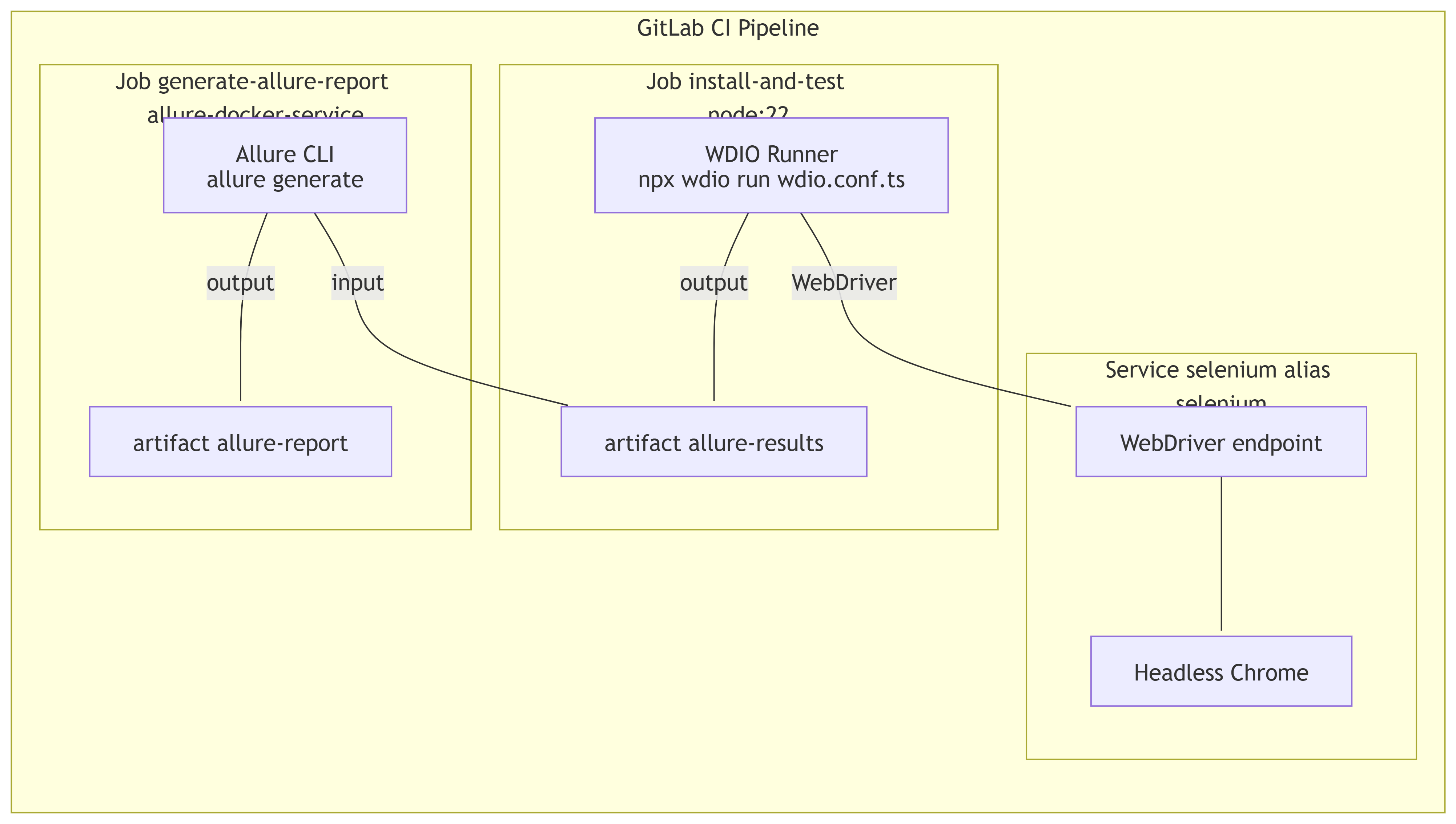
GitLab CI (Job + Service Selenium)
🔄 Execution Flow
- Container Initialization: Docker Compose starts the Selenium and Allure services.
- Test Execution: WebdriverIO sends WebDriver commands to the Selenium instance.
- Result Generation: Test runs produce JSON result files stored in the
allure-resultsdirectory. - Report Creation: Allure processes the results and generates an interactive HTML report.
- Visualization: The generated report can be accessed via a web browser (port 4040).
📂 File docker-compose.yml
services:
  standalone-chrome:
    hostname: selenium
    ports:
      - '4444:4444'
    image: 'selenium/standalone-chrome@sha256:553ff18c2055bc2134cd833211c352d601d91f43fd42a7559f94a28eba96a504'
    environment:
      - SE_NODE_GRID_URL=http://127.0.0.1:4444

  allure:
    image: "frankescobar/allure-docker-service@sha256:0815040339a9d4cc175f69a1c89780f298ee6a55d9f0792cfae20b2718e66aa1"
    environment:
      CHECK_RESULTS_EVERY_SECONDS: 1
      KEEP_HISTORY: 0
    ports:
      - "4040:4040"
      - "5050:5050"
    volumes:
      - ${PWD}/allure-results:/app/allure-results
📦 File package.json
{
  "name": "webdriverio-end2end-test",
  "type": "module",
  "devDependencies": {
    "@wdio/allure-reporter": "^9.13.0",
    "@wdio/cli": "^9.13.0",
    "@wdio/local-runner": "^9.13.0",
    "@wdio/mocha-framework": "^9.13.0",
    "@wdio/spec-reporter": "^9.13.0",
    "allure-commandline": "^2.32.2",
    "ts-node": "^10.9.2",
    "typescript": "^5.4.3",
    "wdio-video-reporter": "^6.1.1"
  },
  "scripts": {
    "wdio": "wdio run ./wdio.conf.ts",
    "allure-generate": "allure generate allure-results"
  },
  "dependencies": {
    "axios": "^1.12.2",
    "minio": "^8.0.5",
    "moment": "^2.30.1",
    "otplib": "^12.0.1",
    "selenium-webdriver": "^4.29.0"
  }
}
▶️ Comandi Utili
# Avvia Selenium e Allure in Docker
docker compose -f docker-compose-local.yml up -d

# Esecuzione test e generazione del report Allure
rm -rf allure-results/*
npx wdio run ./wdio.conf.ts --suite <nome della suite/suites da eseguire>

# Apri il servizio Allure (porta 4040)
http://localhost:4040
🧪 Test Suites Overview
Auth & Settings
- loginAsAdmin.act.ts: Performs administrator login and verifies access.
- setPreferences.act.ts: Configures user preference settings.
- logout.act.ts: Executes logout and session termination.
Dataset
- setupDatasetToBda.act.ts: Performs initial configuration of a dataset for BDA.
- createDatasetToDel.act.ts: Creates a dataset scheduled for deletion.
- deleteDataset.act.ts: Deletes an existing dataset.
- createDatasetToBda.act.ts: Creates a dataset for BDA integration.
BDA Service
- createBdaServiceToDel.act.ts: Creates a BDA service to be deleted afterward.
- deleteBdaService.act.ts: Deletes an existing BDA service.
- createBdaServiceToBda.act.ts: Creates a BDA service for integration.
BDA Application
- createBdaAppNoMlf.act.ts: Creates a BDA application without an ML model.
- editBdaApp.act.ts: Edits the configuration of a BDA application.
- runBdaAppToCompl.act.ts: Executes a BDA application until completion.
- showLogBdaApp.act.ts: Displays logs for a BDA application.
- runBdaAppToStop.act.ts: Starts and stops a BDA application.
- checkDatasetBda.act.ts: Verifies datasets associated with a BDA application.
- handleScheduler.act.ts: Manages the scheduler for BDA applications.
- deleteObjOnMinio.act.ts: Deletes objects stored in MinIO.
📊 Reporting
- Test results are stored in the
allure-resultsdirectory. - The interactive HTML report is generated in
allure-report. - The Allure service is available at
http://localhost:4040.
🔍 Troubleshooting
- Selenium Connection Error: Ensure that the
standalone-chromecontainer is active. - Empty Report: Verify that the
allure-resultsdirectory contains generated result files.
🚀 CI/CD Integration with GitLab
Example of a GitLab pipeline for executing end-to-end tests and generating the Allure report.
📄 File .gitlab-ci.yml
stages:
  - install-and-test
  - generate-allure-report

variables:
  SELENIUM_IMAGE: selenium/standalone-chrome@sha256:553ff18c2055bc2134cd833211c352d601d91f43fd42a7559f94a28eba96a504
  WDIO_CONFIG_PATH: ./wdio.conf.ts
  SE_NODE_GRID_URL: http://selenium:4444

install_dependencies:
  stage: install-and-test
  services:
    - name: $SELENIUM_IMAGE
      alias: selenium
  image: node:22
  tags:
    - docker
  artifacts:
    paths:
      - allure-results
    when: always
    expire_in: 1 day

  script:
    - npm ci
    - npx wdio run $WDIO_CONFIG_PATH --suite alida_1_series alida_2_series #alida_3_series

  only:
    - new-dev

generate-allure-result:
  stage: generate-allure-report
  image: frankescobar/allure-docker-service@sha256:0815040339a9d4cc175f69a1c89780f298ee6a55d9f0792cfae20b2718e66aa1
  tags:
    - docker
  artifacts:
    paths:
      - allure-report
      - allure-results
    when: always
    expire_in: 1 day
  script:
    - allure generate --single-file allure-results --clean -o allure-report
  when: always
  allow_failure: true
🔍 Details
- Stage
install-and-test: Executes tests using WebdriverIO with Selenium running as a Docker service. - Stage
generate-allure-report: Generates the Allure report in HTML format. - Artifacts: Test results (
allure-results) and the generated report (allure-report) are saved as artifacts for download.