Media Workflow Management in Service Development
The Data Analytics System provides Services with the capability to store the Media Workflows they generate within dedicated internal storage areas.
What Are Media Workflows?
Media Workflows refer to multimedia content such as:
- Generic files
- HTML pages
- Logs
- Images (e.g., charts)
Media Workflow Arguments
For each Service, the Data Analytics System will always and automatically supply a set of arguments containing the coordinates of these storage areas. These arguments can then be managed by the core program of the Service (see Example).
| Argument | Value | Notes |
|---|---|---|
--go_manager.base_path |
Path to the folder within the object store where files will be saved | (fixed) |
--go_manager.storage_type |
minio |
(fixed) |
--go_manager.topic |
notifications |
(fixed) |
--go_manager.brokers |
strimzi-kafka-brokers.strimzi-kafka.svc.cluster.local:9092 |
(fixed) |
--go_manager.minIO_URL |
minio.minio:9000 |
(fixed) |
--go_manager.minIO_ACCESS_KEY |
(redacted) | (fixed) |
--go_manager.minIO_SECRET_KEY |
(redacted) | (fixed) |
--go_manager.minio_bucket |
alida |
(fixed) |
--go_manager.use_ssl |
false |
(fixed) |
Saving a Media Workflow
Procedure
If the multimedia content is of type Log, only the metadata must be sent to the Data Analytics System internal Kafka broker.
If the type is one of the remaining options (Generic File, HTML Page, or Image), then:
- Save the file to MinIO
- Send the corresponding metadata in JSON format to the Data Analytics System Kafka broker
To send metadata, the core program must instantiate a Kafka producer.
JSON Metadata Structure
The JSON message for the broker must include the following mandatory attributes:
| Attribute Name | Description |
|---|---|
name |
The content name (displayed on the UI) |
key |
String without spaces (internal reference to the Media Workflow) |
uuid |
UUIDv4 (generated by the user) |
messageType |
picture | file | log | html |
title |
A title |
description |
A description |
var |
Leave empty |
bdaId |
Environment variable passed by the Data Analytics System |
serviceId |
Environment variable passed by the Data Analytics System |
organizationId |
Environment variable passed by the Data Analytics System |
ownerId |
Environment variable passed by the Data Analytics System |
executionId |
Environment variable passed by the Data Analytics System |
accessLevel |
Environment variable passed by the Data Analytics System |
executorId |
Environment variable passed by the Data Analytics System |
executorName |
Environment variable passed by the Data Analytics System |
executorOrgId |
Environment variable passed by the Data Analytics System |
executorOrgName |
Environment variable passed by the Data Analytics System |
created |
Datetime timestamp |
modified |
Datetime timestamp |
show |
true | false |
Additional Attributes for messageType = log
| Attribute Name | Description |
|---|---|
value |
Numeric or string value to display |
valueType |
string | number |
Additional Attributes for messageType != log
| Attribute Name | Description |
|---|---|
path |
File path (including filename) within the Data Analytics System’s MinIO bucket |
extension |
File extension (e.g., .csv, .html) |
filename |
Filename + extension |
Example: Python Utility Functions
# Prepare base metadata message
def prepare_metadata_json(name, messageType):
    result = {
        "name": name,
        "key": name.lower().replace(" ", "-"),
        "uuid": str(uuid.uuid4()),
        "messageType": messageType,
        "created": str(datetime.now()),
        "modified": str(datetime.now())
    }

    # Environment variables automatically passed by the Data Analytics System to the Service
    if "BDA_ID" in os.environ:
        result['bdaId'] = os.environ.get('BDA_ID')
    if "SERVICE_ID" in os.environ:
        result['serviceId'] = os.environ.get('SERVICE_ID')
    if "ORGANIZATION_ID" in os.environ:
        result['organizationId'] = os.environ.get('ORGANIZATION_ID')
    if "OWNER_ID" in os.environ:
        result['ownerId'] = os.environ.get('OWNER_ID')
    if "EXECUTION_ID" in os.environ:
        result['executionId'] = os.environ.get('EXECUTION_ID')
    if "ACCESS_LEVEL" in os.environ:
        result['accessLevel'] = os.environ.get('ACCESS_LEVEL')
    if "EXECUTOR_ID" in os.environ:
        result['executorId'] = os.environ.get('EXECUTOR_ID')
    if "EXECUTOR_NAME" in os.environ:
        result['executorName'] = os.environ.get('EXECUTOR_NAME')
    if "EXECUTOR_ORG_ID" in os.environ:
        result['executorOrgId'] = os.environ.get('EXECUTOR_ORG_ID')
    if "EXECUTOR_ORG_NAME" in os.environ:
        result['executorOrgName'] = os.environ.get('EXECUTOR_ORG_NAME']

    return result


    # For files
    def prepare_file_metadata(name, messageType, path, extension, filename, **kwargs):
        # Preparing generic metadata message
        metadata              = prepare_metadata_json(name=name, messageType=messageType, **kwargs)
        metadata['path']      = path
        metadata['extension'] = extension

        if messageType == "picture":
            metadata['filename'] = filename

        return metadata

    def upload_file_to_minio(minio_url, access_key, secret_key, bucket_name, object_name, local_file_path, secure=False):
      address = minio_url.replace("http://", "").replace("https://", "")
      client = Minio(address, access_key=access_key, secret_key=secret_key, secure=secure)
      client.fput_object(bucket_name, object_name, local_file_path)

    # Sends metadata message to Kafka
    def send_message(data, args):
        producer = _init_producer_kafka(args)
        producer.send(args.go_manager_topic, json.dumps(data).encode('utf-8'))
        producer.flush()

    def send_application_media(file_to_send, file_name, file_type, args, **kwargs):
        folder = args.go_minio_path

        if folder[-1] != "/":
            folder = folder + "/"

        # Preparing metadata message for "files"
        metadata = prepare_file_metadata(
          name=file_to_send.split('.')[0],
          messageType=file_type,
          path=folder + file_name,
          extension=file_to_send.split('.')[-1],
          filename=file_name,
          **kwargs
        )

        # Uploading file to MinIO
        upload_file_to_minio(
          args.go_minio_url,
          args.go_access_key,
          args.go_secret_key,
          args.go_minio_bucket,
          folder + file_name,
          file_to_send,
          secure=args.
          go_use_ssl
        )

        # Sending metadata message to Kafka
        send_message(metadata, args)

    def send_log(name, value, value_type, args, **kwargs):
        # Preparing generic metadata message
        message_to_sent               = prepare_metadata_json(name, "log", **kwargs)
        message_to_sent['value']      = value
        message_to_sent['valueType']  = value_type

        # Note: in the case of "logs", there is no file to upload to MinIO

        # Sending metadata message to Kafka
        send_message(message_to_sent, args)

    # ... omitted ...
Python Example of Service code for Workflow Media sending
    import argparse
    import json

    def str2json(string):
        return json.loads(string)

    def str2bool(v):
        if isinstance(v, bool):
            return v
        if v.lower() in ('yes', 'true', 't', 'y', '1'):
            return True
        elif v.lower() in ('no', 'false', 'f', 'n', '0', ''):
            return False

    parser = argparse.ArgumentParser()
    json_example_ = {
        "test_size": 0.1,
        "train_size": 0.9,
        "random_state": 0,
        "shuffle": True,
        "stratify": None
    }

    parser.add_argument(
      "--json_example",
      help="json test.",
      type=str2json,
      default=json.dumps(json_example_)
    )

    parser.add_argument('--go_manager.brokers', dest='go_manager_brokers', type=str, required=True)
    parser.add_argument('--go_manager.topic', dest='go_manager_topic', type=str, required=True)
    parser.add_argument('--go_manager.base_path', dest='go_minio_path', type=str, required=True)
    parser.add_argument('--go_manager.minio_bucket', dest='go_minio_bucket', type=str, required=True)
    parser.add_argument('--go_manager.minIO_URL', dest='go_minio_url', type=str, required=True)
    parser.add_argument('--go_manager.minIO_ACCESS_KEY', dest='go_access_key', type=str, required=True)
    parser.add_argument('--go_manager.minIO_SECRET_KEY', dest='go_secret_key', type=str, required=True)
    parser.add_argument('--go_manager.use_ssl', dest='go_use_ssl', type=str2bool, required=True)

    args, unknown = parser.parse_known_args()
    from arguments import args
    import json
    import os
    from utils import send_log, send_application_media

    def process():
        json_test = args.json_example

        send_log("json_test_log", json_test, 'json', args)
        send_log("test_log_int", 10, 'int', args)
        send_log("test_log_float", 0.2, 'float', args)
        send_log("test_log_str", "Hi there", 'string', args)

        with open('data.json', 'w') as json_file:
            json.dump(json_test, json_file)

        send_application_media("data.json", "data.json", "file", args)
        send_application_media("test.html", "test.html", "html", args)
        send_application_media("image.png", "image.png", "picture", args)
        send_application_media("gx.zip", "gx.zip", "file", args)

    if __name__ == '__main__':
        process()
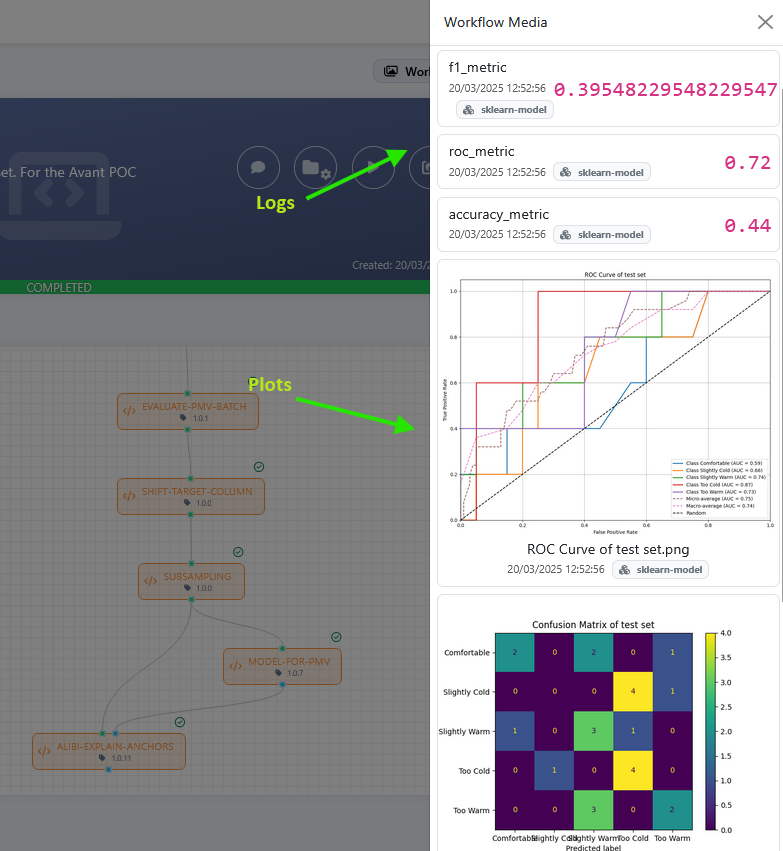
Once the Service will generate and send the Multimedia Contents to the Data Analytics System, these will be available on user unterface. The content visualization mode will depend on its type:
- Generic Files: available for download
- Pagine HTML: renderized in a different tab
- Log: showed on UI
- Images (i.e. graphics): renderized on UI