DATA ANALYTICS SYSTEM
Introduction
The Data Analytics System is part of the Metriqa platform and is based on Alida. It is a Data Science & Machine Learning (DSML) Platform designed to simplify the management, execution, and monitoring of data science and machine learning projects. It offers an integrated environment that allows you to:
- Manage datasets and machine learning models
- Create, execute, and monitor microservice-based workflows
- Work with batch and streaming data, even within the same workflow
- Facilitate scalability and traceability of processing
- Enable non-developer users to create data analytics applications
User Types (Actors)
The Data Analytics System is designed for different types of users, each with their own roles and needs:
- Citizen: These are those who, without being developers or data scientists (supply chain operators / quality officers / agronomists), use the graphical interface to intuitively create, configure, and execute workflows, thus using the results for operational decisions.
- Data Scientist: (agri-food analytics expert) develops advanced models using data from sensors, biosensors, and laboratories, sets up sophisticated analyses, and optimizes machine learning workflows.
- Data Engineer (supply chain data specialist) is responsible for integrating new data sources (IoT sensors, RFID, field and plant systems), managing data flows along the supply chain, and optimizing processes.
- Administrator: Manages supply chain users, assigns roles and permissions according to contractual and regulatory rules, and configures security, compliance, and data sharing parameters.
- Developer (agrifood technology provider) creates new supply chain-specific microservices (e.g., milk quality, batch traceability), integrates APIs (for sensors, blockchain, ERP, certification systems), and extends the catalog with vertical services.
Core Concepts
In the Data Analytics System, everything revolves around a few fundamental concepts:
- Services are independent micro-applications that process inputs and produce outputs.
- Workflows are sequences of Services that use data and models.
- Assets represent fundamental resources such as datasets, models, data sources, and the Workflows themselves.
Each Asset has an access level:
- Private: visible and editable only by the owner
- Team: visible and editable by team members
- Public: visible to everyone
and the following visibility rule applies:
- "Team" Workflows cannot use "Private" assets
- "Public" Workflows cannot use "Team" or "Private" assets
Project
A Project is an organized workspace where the user can collect and manage all the elements needed for a specific goal or presentation. Like a well-organized desk, a Project allows you to:
- Collect datasets, models, and workflows in a single space
- Give the project a meaningful name
- Quickly access everything needed for a specific use case
Practical Example
Project "Sales Forecast 2025" which collects sales datasets, regression models, and prediction workflows.
Workflow Designer
The Data Analytics System offers a graphical interface for building Workflows using Datasets, Services, and Models.
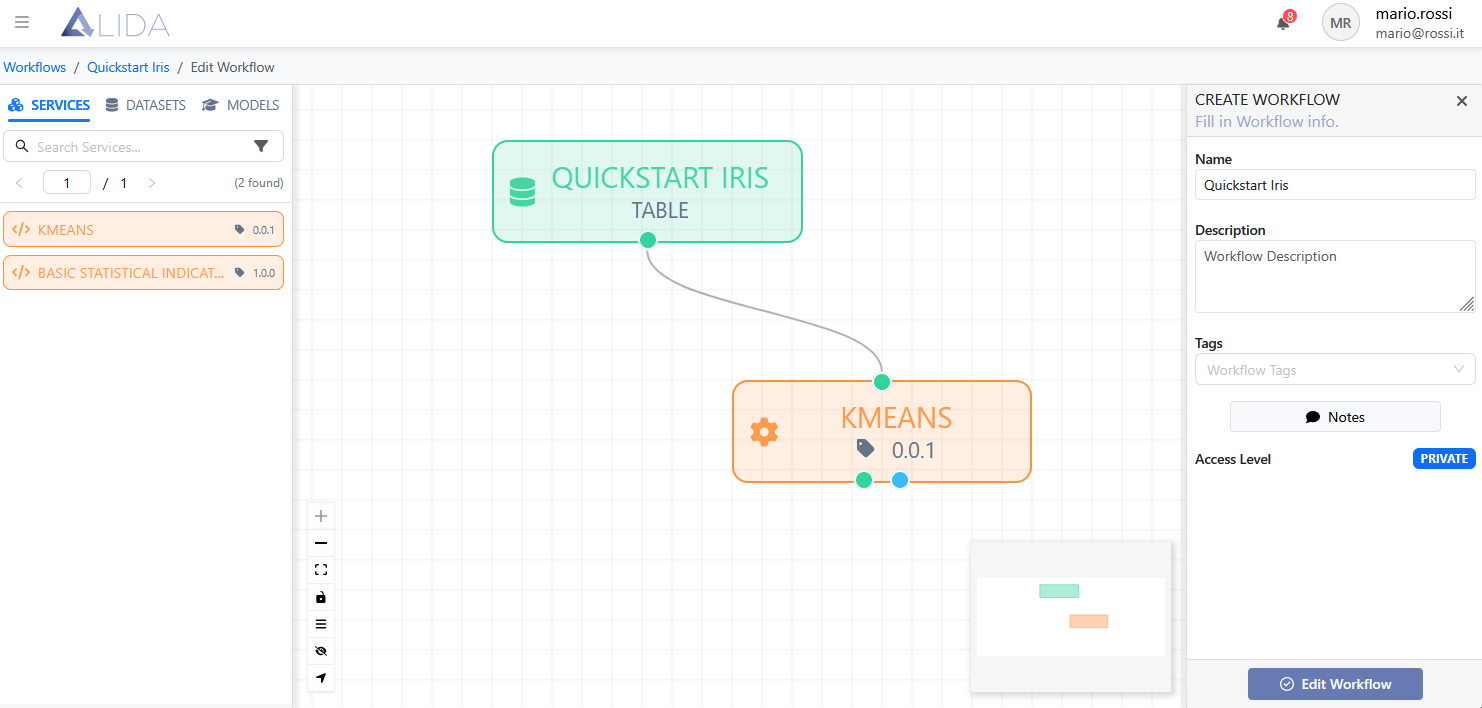
Each Service:
- Can be connected to other Services via arcs
- Can be connected to other assets such as trained Datasets and Models
- Receives configurable parameters (e.g., the value of "K" for a K-Means)
- Can require specific resources (e.g., GPU for training)
Workflow Execution
The Data Analytics System allows you to:
- Manually execute a Workflow
- Schedule periodic executions with Cron expressions
- Export the Workflow as Docker Compose for execution using Docker (on a local machine, server, etc.)
Datasource
A Datasource in the Data Analytics System is metadata that contains useful information for connecting to a storage device (e.g., URL, storage type, access keys, etc.)
Each user registered on the platform has a A personal space dedicated to managing their resources. Specifically, each user will have by default:
- One MinIO-based Datasource with Private access level
- One MinIO-based Datasource for each "Team" they belong to (if any)
- Access to the Public Datasource
The user is free to create new Datasources, including external storage, to make their data visible and easily manageable within the platform.
For more information, visit Asset > Data Source
Notification System
The notification system allows users to monitor the progress and status of their processing in real time via Events.
An Event is a dynamic update sent by the generic Service in execution to inform the user about the status of:
- Processes
- Processing operations
- Any intermediate results or errors
enabling crucial activities such as:
- Monitoring the execution status of Workflows
- Quickly identifying problems or errors during processing
- Viewing intermediate results without waiting for completion
- Making informed decisions based on immediate feedback
Notification System Architecture
- Each Service can emit notifications during execution
- Notifications are sent via Kafka on specific topics
- A management system:
- Pushes notifications to the browser
- Saves all notifications in the catalog for later consultation
Supported Notification Types
- Execution logs
- Images (e.g., graphs, previews)
- Updated parameters
- Compressed files (e.g., zip)
- HTML files
- Other content useful for monitoring or debugging
Practical Example
When training a K-Means model, the Service sends every 10 iterations:
- An image of the current clustering
- A log file with cost values (inertia)
- A ZIP file with intermediate snapshots of the model
The user sees everything in real time, directly from the browser.
Asset History
The Data Analytics System records for each dataset or model produced:
- Workflow that generated it
- Service that processed it
- Parameters used
- Storage location
- Format and technical characteristics
This allows for complete auditing and process reproducibility.
Practical Example
Model "Customer Segmentation 2025" saved in storage location "S", trained by workflow "X", with the execution of dd/mm/yyyy hh:mm:ss, by K-MEANS service "Y" (version "V" created by user "U") with parameters "A, B, and C", using datasets "D", etc.
Scalability
Vertical
Services may require GPUs.
The Data Analytics System can schedule deployment on nodes equipped with GPUs.
Practical Example
Training a neural network on images, deployed on a GPU node.
Horizontal
Batch-intensive Workflows can be distributed using Spark.
Processes are divided into "workers" and deployed on different nodes in the cluster for parallel processing.
Architecture and Integration
The Data Analytics System uses several Open Source tools to provide a complete Data Science environment:
- MinIO for distributed storage of datasets and models
- Kafka for streaming data management
- Spark for distributed data processing
- MLflow for versioning and experiment tracking
- Seldon for deploying models in production
- Argo for workflow orchestration
- Jupyter Notebook for interactive analysis
The architecture is based on microservices deployed on Kubernetes.
In summary, the Data Analytics System allows you to manage heterogeneous data (sensors, structured datasets, process data), acquired both in streaming and batch, stored on distributed storage, and used for advanced analysis and machine learning model training.
From the Pascol use case Use Cases > Pascol, the functionalities offered by Metriqa find concrete application thanks to the use of the Data Space Data Space for the protected sharing of data along the supply chain, the Data Analytics System for the creation and training of machine learning models Asset > Workflow on the farm's IoT data, and the possibility of serving these models in production via model serving services Development > Serving, thus enabling intelligent, predictive and interoperable traceability of extensive farming.